
22 tháng 5, 2026
Tùy biến Walker_Nav_Menu để làm chủ HTML menu WordPress
Walker_Nav_Menu là lớp lõi của WordPress chịu trách nhiệm dựng HTML cho menu điều hướng. Tùy biến walker nghĩa là tạo một lớp con kế thừa nó rồi ghi đè vài method để tự quyết cấu trúc thẻ, class và phần tử bổ sung như icon hay mega menu.

Nguyen Hien
Tôi là Nguyen Hien, Founder Web22, freelance team
Walker_Nav_Menu là lớp lõi của WordPress chịu trách nhiệm dựng HTML cho menu điều hướng. Tùy biến walker nghĩa là tạo một lớp con kế thừa nó rồi ghi đè vài method để tự quyết cấu trúc thẻ, class và phần tử bổ sung như icon hay mega menu.
Mặc định, hàm wp_nav_menu() đẩy ra một khối <ul><li><a> khá cứng nhắc. Khi bạn cần icon đứng cạnh chữ, một class riêng cho mục cha có submenu, hay cả một mega menu (menu lớn nhiều cột), việc nhồi thêm span bằng JavaScript thường rối và dễ vỡ. Cách sạch là can thiệp đúng nơi WordPress sinh markup: lớp Walker.
Walker hoạt động thế nào
Walker là một mẫu thiết kế (design pattern — khuôn xử lý dữ liệu) mà WordPress dùng để đi qua một cấu trúc phân cấp như cây menu. Với menu, lớp đảm nhận việc này là Walker_Nav_Menu, kế thừa từ lớp trừu tượng Walker. Mỗi khi đi qua cây, nó gọi bốn method theo thứ tự cố định cho từng cấp:
start_lvl()— mở một submenu, tức thẻ<ul class="sub-menu">.start_el()— mở một mục menu, tức<li>kèm thẻ<a>bên trong.end_el()— đóng mục menu (</li>).end_lvl()— đóng submenu (</ul>).
Khi tùy biến, bạn không viết lại cả lớp. Bạn tạo một lớp con, chỉ ghi đè đúng method cần đổi, phần còn lại để lớp cha lo. Đây là nguyên tắc kế thừa (inheritance — lớp con dùng lại lớp cha) giúp code gọn và ít rủi ro.
Khi nào thật sự cần custom walker
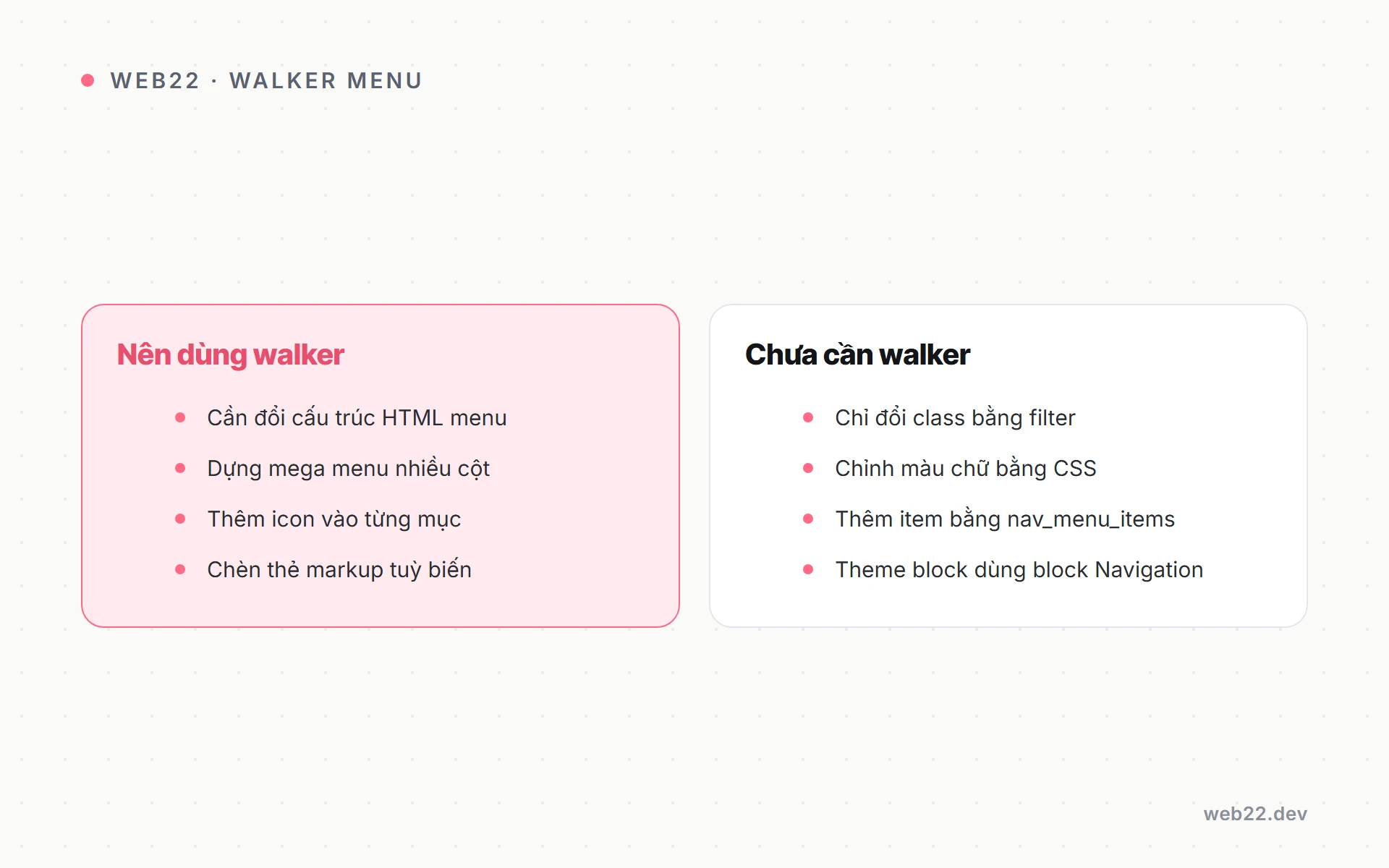
Không phải lúc nào cũng cần. Nếu bạn chỉ muốn đổi màu, khoảng cách, hay hiện submenu khi rê chuột thì CSS là đủ. Custom walker chỉ xứng đáng khi bạn cần thay đổi chính cấu trúc HTML:
- Chèn icon, badge hoặc mô tả phụ vào bên trong thẻ
<a>. - Gắn class động lên mục cha (ví dụ
has-children) để CSS/JS bắt được. - Dựng mega menu — submenu cấp 1 cần đổi từ
<ul>sang một khối nhiều cột. - Tích hợp class của một framework giao diện (Bootstrap, Tailwind) vào từng cấp.
Trong quá trình tự code theme và plugin web22-core, Web22 thường chọn ngưỡng đơn giản: nếu CSS giải quyết được thì dừng ở CSS; chỉ đụng tới walker khi DOM bắt buộc phải khác.
Bộ khung một lớp walker kế thừa
Đặt đoạn này trong functions.php của child theme hoặc trong một plugin nhỏ. Lưu ý chữ ký method theo bản WordPress hiện hành: start_el() nhận tham số thứ hai là $data_object và tham số cuối là $current_object_id.
class Web22_Nav_Walker extends Walker_Nav_Menu {

    // Mở submenu: đổi class mặc định sub-menu
    public function start_lvl( &$output, $depth = 0, $args = null ) {
        $indent = str_repeat( "t", $depth );
        $output .= "n$indent<ul class="sub-menu depth-$depth">n";
    }

    // Mở một mục: tự dựng li + a
    public function start_el( &$output, $data_object, $depth = 0, $args = null, $current_object_id = 0 ) {
        $item    = $data_object; // đổi tên cho dễ đọc
        $classes = empty( $item->classes ) ? array() : (array) $item->classes;

        // Đánh dấu mục có con để CSS/JS bắt
        $has_children = in_array( 'menu-item-has-children', $classes, true );
        if ( $has_children ) {
            $classes[] = 'has-children';
        }

        $class_str = join( ' ', array_filter( $classes ) );
        $output   .= '<li class="' . esc_attr( $class_str ) . '">';

        $title = apply_filters( 'the_title', $item->title, $item->ID );
        $url   = ! empty( $item->url ) ? $item->url : '#';

        $output .= '<a href="' . esc_url( $url ) . '">' . esc_html( $title ) . '</a>';
    }
}
Vài điểm cần nhớ ở đoạn trên:
$outputđược truyền bằng tham chiếu (dấu&) nên bạn nối chuỗi vào nó chứ khôngreturn.- WordPress tự gọi
end_el()vàend_lvl()để đóng thẻ, nên ở ví dụ tối giản này bạn không cần ghi đè chúng — lớp cha đóng</li>và</ul>giúp. - Luôn bọc dữ liệu xuất ra bằng
esc_url(),esc_html(),esc_attr()để chống lỗi bảo mật.
Thêm icon vào từng mục menu
Một cách phổ biến và không cần sửa code khi đổi icon: lưu tên class icon vào trường có sẵn của mục menu. Trong màn hình Appearance → Menus, bật ô CSS Classes (qua nút Screen Options), rồi gõ ví dụ icon-home. Walker đọc lại class đó:
// trong start_el(), ngay trước khi dựng thẻ a
$icon = '';
foreach ( $classes as $c ) {
    if ( strpos( $c, 'icon-' ) === 0 ) {
        $icon = '<i class="' . esc_attr( $c ) . '" aria-hidden="true"></i> ';
        break;
    }
}

$output .= '<a href="' . esc_url( $url ) . '">'
        . $icon . esc_html( $title )
        . '</a>';
Với cách này, người quản trị tự đổi icon ngay trong wp-admin mà không phải nhờ lập trình viên. Nếu bạn muốn icon là một field riêng đẹp hơn, hãy nghĩ tới việc gắn meta cho mục menu — đây là lúc kiến thức về đăng ký custom post type bằng code và meta liên quan trở nên hữu ích.
Dựng mega menu bằng start_lvl()
Mega menu khác submenu thường ở chỗ: cấp 1 không phải danh sách dọc mà là một panel rộng. Bí quyết là xét $depth trong start_lvl() để đổi markup ở đúng cấp:
public function start_lvl( &$output, $depth = 0, $args = null ) {
    if ( 0 === $depth ) {
        // submenu cấp 1: panel mega menu
        $output .= '<div class="mega-panel"><ul class="mega-grid">';
    } else {
        // các cấp sâu hơn: ul thường
        $output .= '<ul class="sub-menu">';
    }
}

public function end_lvl( &$output, $depth = 0, $args = null ) {
    if ( 0 === $depth ) {
        $output .= '</ul></div>';
    } else {
        $output .= '</ul>';
    }
}
Lúc này phần còn lại — bố cục nhiều cột, ảnh, mô tả — bạn xử lý bằng CSS Grid trên class mega-grid. Walker chỉ lo dựng đúng khung HTML; phần nhìn để CSS đảm nhận. Đây cũng là triết lý tách bạch trong cách Web22 code theme theo yêu cầu: logic ở PHP, hình thức ở CSS.
Gọi walker khi in menu ra
Sau khi có lớp, bạn nạp nó vào wp_nav_menu() qua tham số walker tại template (thường là header.php):
wp_nav_menu( array(
    'theme_location' => 'primary',
    'container'      => 'nav',
    'menu_class'     => 'main-menu',
    'walker'         => new Web22_Nav_Walker(),
) );
Nhớ khai báo vị trí menu primary bằng register_nav_menus() trong functions.php trước, nếu theme của bạn chưa có.

Lưu ý cho theme block và FSE
Với theme block (Full Site Editing — chỉnh toàn site bằng block), menu thường dùng block Navigation chứ không gọi wp_nav_menu(). Block Navigation không nhận tham số walker, nên kỹ thuật trên áp dụng cho theme cổ điển (classic) hoặc phần PHP của theme lai (hybrid). Nếu site bạn theo hướng FSE, hãy cân nhắc một block điều hướng tùy biến thay vì walker — chủ đề này nối thẳng với khác biệt giữa theme block và theme cổ điển.
Câu hỏi thường gặp
Custom walker có làm chậm site không?
Không đáng kể. Walker chạy một lần khi dựng menu, và menu thường được cache trang cùng phần còn lại. Hiệu năng phụ thuộc nhiều hơn vào tổng số mục menu chứ không phải việc bạn ghi đè method.
Đặt lớp walker ở file nào?
Có thể đặt thẳng trong functions.php của child theme cho nhanh, nhưng gọn nhất là một file riêng rồi require vào, hoặc gói trong plugin nhỏ để giữ logic theo bạn khi đổi giao diện.
Vì sao menu trống khi tôi ghi đè start_el()?
Thường do bạn quên nối chuỗi vào $output (truyền bằng tham chiếu) hoặc dùng sai thứ tự tham số. Kiểm tra lại chữ ký: start_el( &$output, $data_object, $depth, $args, $current_object_id ).
Nếu bạn cần một menu phức tạp chạy ổn định trên cả mobile lẫn desktop mà không muốn tự xoay xở từng dòng walker, Web22 nhận làm website WordPress bằng theme tự code để bạn có cấu trúc rõ ràng, dễ bảo trì về sau.
Dịch vụ liên quan
Thiết kế website để khách dễ tìm thông tin, bạn dễ quản trị và mở rộng Web22 nhận thiết kế website cho cá nhân, cửa hàng và doanh nghiệp cần giới thiệu, bán hàng hoặc tiếp nhận yêu…Cùng chủ đề WordPress
Đang tính làm website hoặc muốn web đang chạy nhanh hơn? Nhắn cho Web22 một câu là được.