KIếN THứC WEBSITE › WORDPRESS

WooCommerce theme support — 3 cấp độ + override template

WooCommerce theme support — 3 cấp độ + override template 2026

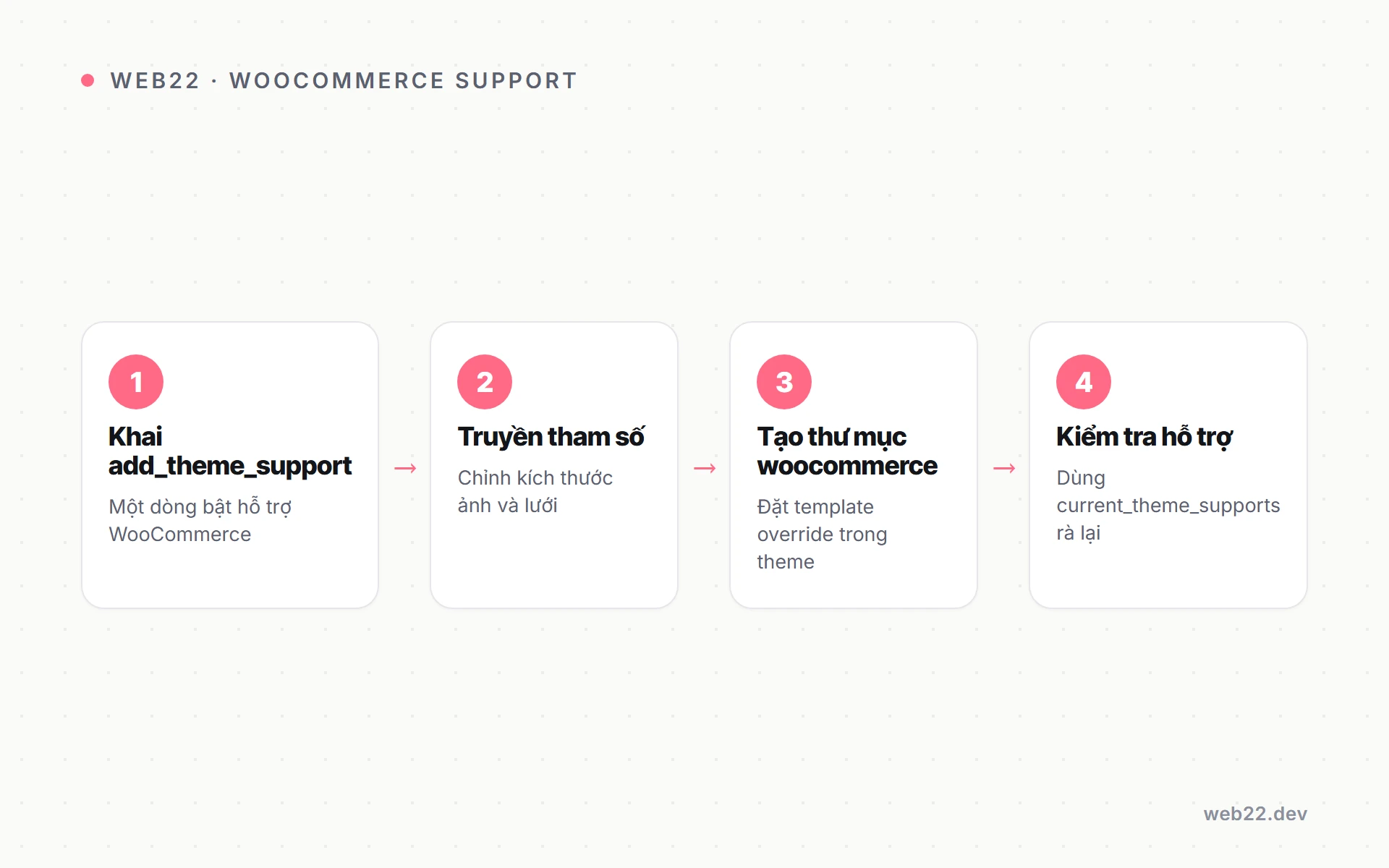
Active WooCommerce trên theme không declare support sẽ thấy ngay warning “Your theme does not declare WooCommerce support” trong admin notice — kèm markup vỡ, CSS conflict layout chính, và conversion rate thấp hơn rõ rệt. Bài này hướng dẫn 3 cấp độ theme support, override template woocommerce/* đúng pattern an toàn, hook wrap layout match design theme, và checklist E2E 10 điểm test với product set thực tế.

declare WooCommerce support và 3 cấp độ tích hợp

woocommerce theme support — declare WooCommerce support và 3 cấp độ tích hợp
Sơ đồ minh hoạ — declare WooCommerce support và 3 cấp độ tích hợp
declare WooCommerce support và 3 cấp độ tích hợp
Sơ đồ minh hoạ — declare WooCommerce support và 3 cấp độ tích hợp

add_theme_support('woocommerce') là cách theme báo với plugin WooCommerce rằng nó sẽ handle markup shop chủ động, không cần plugin wrap output bằng container mặc định. Khi không declare, WooCommerce chèn <div class="woocommerce-page"> wrapper quanh nội dung — break layout custom đã setup.

Ba cấp độ support khác nhau cơ bản ở effort dev và mức pixel-perfect đạt được. Chọn cấp độ phù hợp với business model shop chứ không chọn theo “càng nhiều càng tốt”.

Decision tree chọn cấp độ tích hợp

Quyết định cấp độ support nên dựa trên doanh thu shop và độ ưu tiên của shop trong tổng thể website. Quyết định sai dẫn tới hoặc waste effort, hoặc thiếu pixel-perfect khi cần.

  • Cấp 1 — basic support: theme generic dùng cho nhiều client, shop chỉ là feature phụ — effort 5 phút, declare 4 dòng là xong.
  • Cấp 2 — declared và override layout: shop là feature chính nhưng layout đơn giản (grid 3 cột, sidebar filter) — effort 8-16 giờ override template chính.
  • Cấp 3 — fully integrated: shop là core business, conversion là KPI cao nhất — effort 40-80 giờ custom flow checkout, upsell logic, A/B test friendly.

Tín hiệu nâng cấp từ cấp 1 lên cấp 2-3

Nhiều shop bắt đầu cấp 1 rồi grow lên cấp 2-3 khi doanh thu tăng. Các tín hiệu dưới đây cho thấy đã đến lúc đầu tư nâng cấp tích hợp.

  • Conversion rate thấp dưới 1%: shop checkout flow generic không tối ưu — đầu tư override checkout/form-checkout.php tăng conversion 30-50%.
  • Doanh thu vượt 500 triệu/tháng: ROI custom theme rõ rệt — mỗi % conversion thêm là chục triệu thêm doanh thu.
  • Cần A/B test landing page: theme cấp 1 không có hook để inject variant — phải nâng cấp lên cấp 3 để A/B framework hoạt động.

add_theme_support(‘woocommerce’) — minimal setup

Setup cấp 1 chỉ cần 3-4 dòng trong inc/setup.php. Đoạn code dưới declare support cơ bản và 3 sub-feature gallery WooCommerce phổ biến nhất.

add_action('after_setup_theme', function () {
    add_theme_support('woocommerce');
    add_theme_support('wc-product-gallery-zoom');
    add_theme_support('wc-product-gallery-lightbox');
    add_theme_support('wc-product-gallery-slider');
});

Mỗi sub-feature gallery là một cải tiến UX nhỏ nhưng tác động trực tiếp lên conversion. Chỉ đóng những feature em chắc chắn không dùng — mở mọi cái cũng không tốn nặng performance.

  • wc-product-gallery-zoom: hover zoom ảnh chính cho thấy chi tiết sản phẩm — Baymard Institute research cho thấy tăng conversion 5-10% cho shop apparel và décor.
  • wc-product-gallery-lightbox: click ảnh mở lightbox fullscreen — cần Photoswipe library mà WooCommerce ship sẵn, không phải enqueue thêm.
  • wc-product-gallery-slider: swipe thumbnail mobile — bắt buộc nếu UX mobile-first và shop có nhiều ảnh per sản phẩm.

Hook after_setup_theme bắt buộc

Declare support phải nằm trong hook after_setup_theme — không phải init. Sai hook gây WooCommerce không nhận diện được support, vẫn hiển thị warning admin notice.

Override template woocommerce — file structure đúng pattern

WooCommerce ship với hơn 60 template file trong plugins/woocommerce/templates/. Theme override bằng cách copy file vào folder theme/woocommerce/ giữ đúng path tương đối — WooCommerce tự load file theme thay vì file gốc plugin.

Pattern này gọi là template inheritance. Đây là cơ chế chính thức WooCommerce hỗ trợ, không phải hack — em có thể override mọi template từ archive đến checkout mà không touch plugin.

Cấu trúc folder override chuẩn

Folder woocommerce trong theme phải mirror đúng cấu trúc folder template gốc plugin. Sai path đồng nghĩa override không được nhận.

theme/woocommerce/
├── archive-product.php           // shop archive page
├── single-product.php            // single product page
├── single-product/
│   ├── price.php                 // hiển thị giá
│   ├── title.php                 // tên product
│   ├── add-to-cart/
│   │   └── simple.php            // form add cart simple product
│   └── meta.php                  // SKU, category, tag
├── content-product.php           // 1 item trong loop
├── cart/
│   └── cart.php                  // trang cart classic
├── checkout/
│   └── form-checkout.php         // form checkout classic
└── myaccount/
    └── dashboard.php             // user dashboard

Bốn quy tắc override an toàn

Override sai pattern dẫn tới break khi WooCommerce update. Bốn quy tắc dưới là chuẩn cộng đồng WooCommerce dev — bám theo để tránh đau đầu mỗi major update.

  • Copy nguyên file, không edit partial: copy 100% nội dung rồi customize — track diff sau dễ hơn khi WooCommerce update template gốc.
  • Giữ comment header với version number: dòng @version 8.x.x đầu file giúp em biết template version nào — khi WooCommerce update, check changelog version đó có thay đổi không.
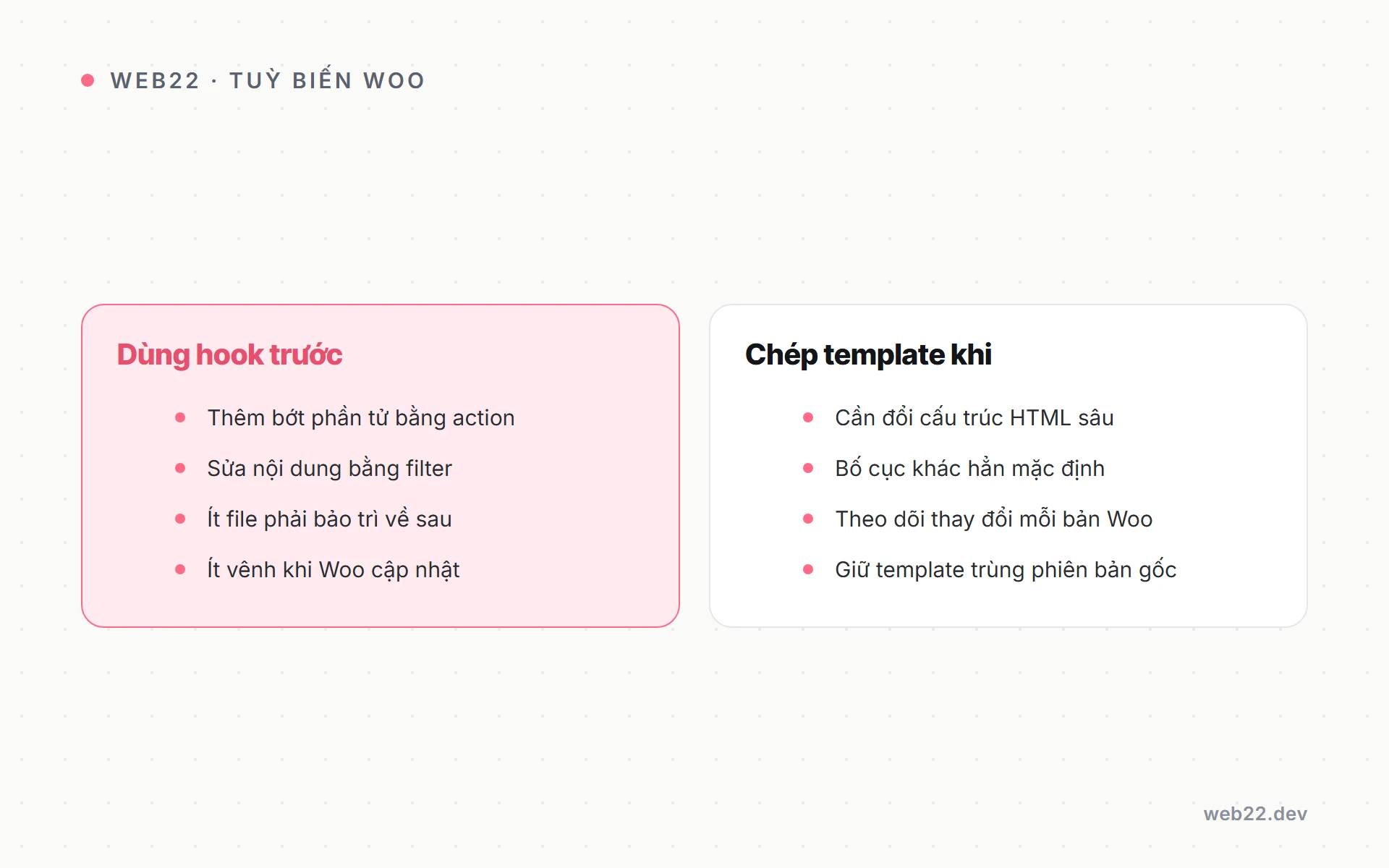
  • Không override chỉ để thêm CSS class: dùng filter woocommerce_product_loop_start hay woocommerce_post_class nhẹ hơn nhiều.
  • Track override qua System Status: WooCommerce có System Status report template outdated — kiểm hàng tháng để biết file nào cần merge change từ version mới.

Sai lầm phổ biến khi override template

Hai sai lầm dưới gặp ở 80% theme freelancer Việt Nam. Cả hai đều dễ tránh nếu nắm quy tắc override an toàn từ đầu.

  • Edit thẳng trong plugin folder: mất hết override khi WooCommerce auto-update — luôn copy vào theme folder trước khi sửa.
  • Override với placeholder TODO: override file rồi comment “TODO: implement” — file template không hoàn chỉnh gây trắng section trên frontend.

Hook before/after main content — wrap layout match theme

Template WooCommerce có sẵn 2 hook woocommerce_before_main_contentwoocommerce_after_main_content để theme inject wrapper container. Pattern này tránh phải override toàn bộ template chỉ để thêm <div> wrap.

WooCommerce mặc định hook 2 function woocommerce_output_content_wrapper vào 2 point này. Theme cần remove default rồi add wrapper riêng để match layout chính.

Pattern wrap pixel-perfect

Đoạn code dưới remove wrapper mặc định và add wrapper match container theme. Theme web22-2026 wrap shop trong cùng container như blog: max-width 1240px, padding 56px desktop 24px mobile.

// inc/woocommerce.php
remove_action('woocommerce_before_main_content', 'woocommerce_output_content_wrapper', 10);
remove_action('woocommerce_after_main_content', 'woocommerce_output_content_wrapper_end', 10);

add_action('woocommerce_before_main_content', function () {
    echo '<div class="container"><main id="content" class="shop-main">';
}, 10);

add_action('woocommerce_after_main_content', function () {
    echo '</main></div>';
}, 10);

// Bỏ sidebar mặc định nếu theme không dùng
remove_action('woocommerce_sidebar', 'woocommerce_get_sidebar', 10);

Conditional wrapper khác nhau cho archive vs single

Shop archive và single product page có thể cần layout container khác nhau. Pattern hay là check context trong callback và return wrapper phù hợp.

  • Archive grid 3-4 cột: container rộng 1400px để hiển thị nhiều product card per row — UX scan nhanh.
  • Single product 2 cột: container hẹp hơn 1100px để focus vào product detail — image lớn, description đầy đủ.
  • Cart và checkout 1 cột: container 720px để form ngắn, dễ focus — checkout không nên có distraction sidebar.

Custom product loop và pattern an toàn

Custom loop đồng nghĩa override content-product.php để thay markup mỗi product item. Đây là file template dùng cho cả shop archive và shortcode [products] — sửa 1 chỗ apply mọi nơi.

Pattern an toàn dưới đây giữ mọi hook WooCommerce cần (vd woocommerce_before_shop_loop_item) để plugin extension như Quick View vẫn hoạt động — không cắt mọi thứ vì cẩu thả.

Override content-product.php

// theme/woocommerce/content-product.php
<?php
global $product;
if (empty($product) || !$product->is_visible()) return;
?>
<article <?php wc_product_class('w22-card', $product); ?>>
    <a href="<?= esc_url(get_permalink()) ?>" class="card-media">
        <?= woocommerce_get_product_thumbnail('w22-card') ?>
        <?php if ($product->is_on_sale()): ?>
            <span class="badge sale">Sale</span>
        <?php endif; ?>
    </a>
    <div class="card-body">
        <h3 class="card-title">
            <a href="<?= esc_url(get_permalink()) ?>">
                <?= esc_html($product->get_name()) ?>
            </a>
        </h3>
        <div class="card-price"><?= $product->get_price_html() ?></div>
        <?php woocommerce_template_loop_add_to_cart(); ?>
    </div>
</article>

Custom cart và checkout — block-based vs classic

WooCommerce 9.x default dùng block-based cart/checkout (Gutenberg block woocommerce/cartwoocommerce/checkout). Override khác hoàn toàn so với classic shortcode-based.

  • Block-based: không có template PHP — chỉ có React block — custom qua block variation hoặc filter render_block.
  • Classic shortcode: vẫn override file cart/cart.phpcheckout/form-checkout.php như cũ — pattern cũ vẫn hoạt động.
  • Migration path khuyến nghị: site mới install dùng block-based — site cũ migrate cần test plugin payment VN cẩn thận.

Testing với product set thực tế — checklist E2E 10 điểm

WooCommerce ship sample data XML trong plugins/woocommerce/sample-data/sample_products.xml. Import qua Tools → Import → WordPress để tạo 24 product test với variant, attribute, cross-sell, upsell.

Test với product set thật quan trọng hơn nhiều so với test với 1-2 product tạo tay. Variant product, coupon, tax đều có edge case chỉ lộ ra khi có data đa dạng.

Mười điểm checklist E2E bắt buộc

Checklist dưới là baseline trước khi deploy theme shop production. Skip điểm nào cũng có nguy cơ user gặp bug trong flow mua hàng — chi phí cao hơn nhiều so với chi phí test.

  1. Shop archive load không error, grid match design theme
  2. Single product gallery zoom và lightbox work mượt mobile + desktop
  3. Variable product (size + color) UI dropdown đúng, không miss variant nào
  4. Add to cart AJAX không reload page, mini-cart update đúng count
  5. Cart page tổng tiền và ship và tax tính đúng theo địa chỉ
  6. Checkout form validate inline email và phone số VN (10 chữ số)
  7. Apply coupon hoạt động, giảm giá đúng amount và type (% vs fixed)
  8. Place order tạo order ID, gửi email customer và admin trong 30 giây
  9. My account dashboard hiển thị order history với link xem chi tiết
  10. Mobile 375px: navigation, cart icon, checkout không vỡ layout

Tool hỗ trợ test E2E

Test thủ công 10 điểm trên mỗi deploy tốn 2-3 giờ. Vài tool dưới đây giúp tự động hoá phần lớn flow để giảm cost test xuống dưới 30 phút.

  • Playwright cho E2E test: script test checkout flow đầy đủ — run trong CI/CD trước mỗi deploy, fail build nếu flow vỡ.
  • WP-CLI cho seed data: tạo product test programmatic — reproduce environment giống production để bug không trượt qua staging.
  • BrowserStack cho cross-browser: test Safari iOS, Chrome Android thật — emulator không thể tin 100% cho payment form.

WooCommerce 9.x — block-based cart/checkout

WooCommerce 9.0 phát hành 2024 chuyển default sang block-based cart/checkout. Site mới install tự động dùng block.

Site cũ migrate cần test kỹ vì có nhiều breaking change so với classic.

Khác biệt đáng lưu ý khi migrate

Migrate từ classic sang block-based không phải drop-in replacement. Bốn khác biệt dưới ảnh hưởng trực tiếp tới theme custom và plugin extension đang dùng.

  • Layout source: block-based dùng theme.json colors/fonts — classic dùng CSS theme — design system phải sync giữa 2 nguồn.
  • Custom field hook: hook woocommerce_form_field không apply cho block — phải dùng woocommerce_blocks_checkout_block_registration để extend.
  • Performance fetch data: block-based fetch product qua REST API — cần optimize cache plugin Redis hoặc Object Cache Pro để không lag.
  • Plugin compatibility: nhiều plugin VN (VNPay, MoMo, ZaloPay) chưa fully support block — stick classic shortcode cho shop VN tới khi gateway plugin update.

Câu hỏi thường gặp

Theme đã hỗ trợ WooCommerce nhưng vẫn warning — fix thế nào?

Check 3 thứ theo thứ tự. Thứ nhất: add_theme_support('woocommerce') phải hooked vào after_setup_theme chứ không phải init.

Thứ hai: theme không có file woocommerce.php ở root vì file này override toàn bộ WooCommerce routing. Thứ ba: clear WooCommerce transient qua WooCommerce → Status → Tools → Clear transients.

Có cần override mọi template WooCommerce?

Không. Chỉ override file thực sự cần customize cho business của shop.

Override mọi file = nợ technical debt 60+ file cần maintain mỗi WooCommerce update.

Theme web22-2026 chỉ override 8 file: archive-product, single-product, content-product, content-product-cat, cart/cart, checkout/form-checkout, myaccount/dashboard, single-product/price. Đủ cho hầu hết shop production.

Template hiện outdated trong System Status — phải làm gì?

WooCommerce update template gốc thường để fix bug security. Đọc changelog version mới, diff template gốc với template override, merge change vào file override.

Sau đó update @version header trong file override để khớp version mới. Đừng ignore warning — outdated template thường tương đương security risk hoặc bug đã được fix mà em không nhận.

Block-based cart/checkout có hoạt động với payment gateway VN không?

VNPay, MoMo, ZaloPay plugin VN chưa fully compatible block tính tới Q4 2025. Block-based checkout dùng REST API khác với form POST truyền thống — nhiều gateway VN chưa update integration.

Khuyến nghị stick classic shortcode cho shop VN tới khi gateway plugin xác nhận support block. Check changelog plugin payment định kỳ — khi gateway support block sẽ thông báo trong release notes.

Có nên dùng theme premium WooCommerce như Flatsome, Astra Pro?

Tùy scope và doanh thu shop. Theme premium fit shop generic 5-7 ngày setup, đạt conversion 60-70% là khả thi.

Theme custom cần 4-8 tuần dev nhưng conversion có thể đạt 80-90% và 100% control performance.

Ngưỡng quyết định kinh nghiệm: doanh thu dưới 500 triệu/tháng dùng premium đủ, trên 1 tỷ/tháng custom ROI cao hơn rõ rệt. Giữa khoảng đó cân nhắc theo độ ưu tiên UX và brand.

Tài nguyên và bước tiếp theo

Tích hợp WooCommerce đúng pattern là foundation cho shop production scale. Sau khi nắm 3 cấp độ support và pattern override, mở rộng sang các topic shop chuyên sâu khác.

Cần đội Web22 build shop WooCommerce fully integrated với payment VN và shipping nội địa cho dự án của bạn? Tư vấn migrate Classic theme lên Block theme FSE — bàn giao kèm tích hợp VNPay/MoMo/ZaloPay và GHN/GHTK, kiểm thử E2E 10 điểm checklist.